Masi: Door-to-Door Rail Travel for Saudi Arabia
I audited Saudi Arabia Railways’ booking, then helped design the launch app that books the train and the rides at both ends as one trip.
Client
SAR & HRR
Deliverables
SAR audit and research
Booking and mobility flows
UI and design system
Year
2025–2026

Book the train, and the rides at both ends.
One trip from your door to your destination, across Saudi Arabia’s two railways and three mobility partners.

01 The brief
Two railways, three ride partners, one booking.
Masi is a new travel app for Saudi Arabia and the official ticketing partner of Saudi Arabia Railways (SAR) and the Haramain High Speed Railway (HHR). It sells the train and the journey around it: a Jeeny or CTC ride to the station, and a ride or a Telgani rental car at the other end, booked and paid for as one trip.
I was one of three designers at Rimthan on the launch version. I ran the audit and research on SAR’s existing product, and had a large share of the booking and mobility flows, the UI and the design system. The back office for operators and the landing page were designed by teammates, and both are part of the same launch.
Category
Rail and mobility
Train tickets with the first and last mile, for Saudi Arabia.
Scope
Audit to launch
An audit of SAR’s app, web and stores, then the flows for launch.
Platform
iOS and Android
English and Arabic, right to left, Gregorian and Hijri.
Team
Three designers
With a back office and a landing page built alongside.

Door to door, in one booking
The trip summary is the product in one screen: the ride to Riyadh station, the train, and the leg from Dammam, each in its own colour.
02 What I found
SAR’s booking ended at the platform.
Before drawing anything, I mapped SAR’s booking end to end: 49 screens of the iOS app, 19 pages of the web booking, the PDF ticket and both store listings. The screen map became the shared reference for the team and the starting point for the new flows.
Three findings shaped what came next. The trip stopped at the platform, with nothing about getting to Riyadh station or onward from Dammam. Every extra was its own sheet, chosen one passenger at a time. And dates were Gregorian only, in a country that also plans in Hijri.

SAR today, screen by screen
A sample of the audit board, with the three findings tagged on the screens where they show up.
03 Door to door
Make the route the interface.
The idea fits in one picture: a line from your door to your destination, blue for the ride, purple for the train, green for the leg at arrival. It opens the app in onboarding and comes back wherever a trip is shown: on the home screen, on the trip summary and on the map while you pick a pickup point.
Arabic sits next to English from the first screen, with right-to-left layouts for onboarding, stations and dates, instead of a translation pass at the end.

One idea, two languages
Onboarding in English and Arabic draws the same route, followed by the language choice.

The whole booking
Search, results, fare, extras, rides, payment and the e-ticket, played from the launch screens.
04 Finding the train
Compare what you get, not just the price.
Results show the essentials first: times, duration, stops and the starting price, with badges for best price, seats left and wheelchair access. Sort and filter cover cheapest, fastest, departure, arrival and accessibility.
Choosing a fare opens one sheet that compares Economy Saver, Economy, Business and the private cabin, with what each includes and what changing or cancelling costs. Dates can be picked in the Gregorian or the Hijri calendar.

Dates, trains and fares
The Hijri calendar, results with seats left, and a fare sheet that shows what is included before you choose.

The edges, designed too
Sort and filter, a day with no trains, and the trip summary that holds the booking for 15 minutes.
05 Extras
One hub for meals, seats, bags and the lounge.
In the old flow every extra was its own sheet, set per passenger. The launch design gathers them in one extras hub with an apply-to-all switch, so a family does not choose the same bag four times.
Meals open into a detail with allergens, baggage is chosen by weight and size, seats on a coach map, and the lounge is one toggle. On the return leg, Masi offers to apply the same selection again.

Meals, without leaving the trip
The list scrolls under a fixed header and a footer that keeps the hold timer and the total in view.

Extras in one place
The extras hub, the seat map for the return leg, and baggage chosen by weight.
06 First and last mile
The ride to the station is part of the ticket.
After the train, Masi offers pickup and drop-off. You set the address by search or on the map, and the app recommends rides from Jeeny and CTC with an estimated price, or a Telgani car waiting at the arriving station.
Groups were the hard case. When no single vehicle fits, Masi says so plainly and offers to split the group into several rides, confirms each one, and the trip summary shows both cars on the same leg.

Split and ride
Six passengers and no car that fits them: the group becomes two rides, and both land on the same leg of the trip.

Pickup, on the map
Add pickup and drop-off, confirm the pickup point on the map, and choose from recommended rides.

A car at the other end
Telgani rentals sit next to taxis, with the on-time and price guarantees explained before you book and the return explained after.
07 Pay and travel
One payment, then the trip lives on your phone.
Everything is paid in one checkout, with Apple Pay or a card, under one booking reference. E-tickets carry a QR code per passenger and can be shared with each traveller or added to Apple Wallet.
On the day, the trip moves to the lock screen: a notification when the tickets are ready, the platform and coach on the pass, and a nudge when it is time to meet the rental car.

After payment
Apple Pay, the e-ticket, and lock-screen notifications for the tickets and the rental car.
08 Two operators
HHR runs on the same parts.
HHR comes with its own rules: sign-in with a phone number and a one-time code, an ID scan and its own passenger details. Instead of a second app inside the app, the HHR flow is built from the same components as SAR, so a traveller learns Masi once.
The same system carries people who come back: recent routes return as Book again, upcoming trips sit in My bookings, and a group too big for one private cabin is told how to split before it reaches checkout.
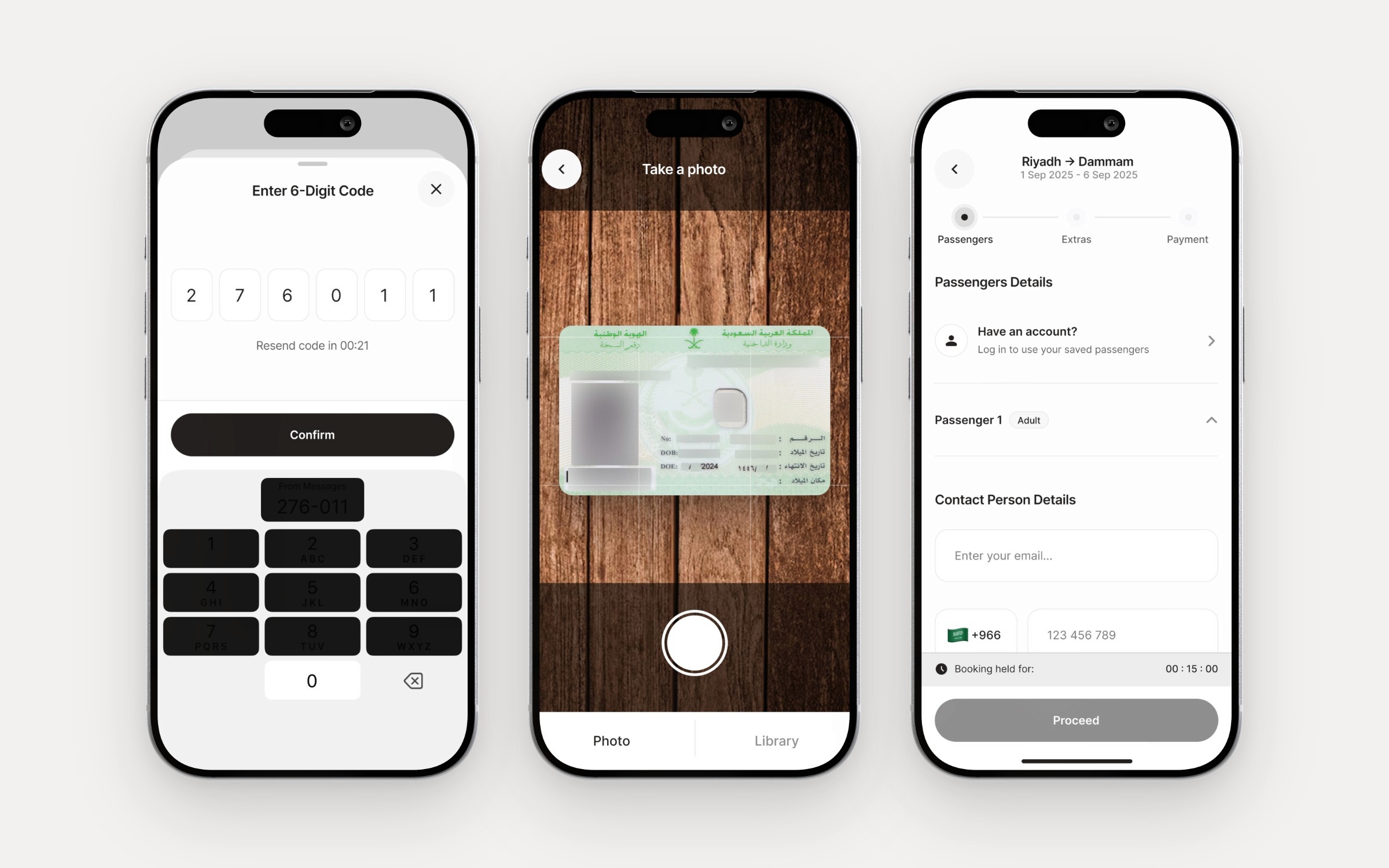
HHR on the same system
Phone sign-in with a one-time code, an ID scan, and passenger details, built from the SAR components.

Coming back
Book again on the home screen, a one-tap rebook, and upcoming trips in My bookings.
2
Railways in one booking: SAR and HHR
3
Mobility partners: Jeeny, CTC and Telgani
49
SAR iOS screens mapped in the audit
19
Pages of SAR’s web booking mapped
19
Flows in the launch file
400+
Screens in the launch file, across the team
2
Languages, with right-to-left Arabic
2
Calendars, Gregorian and Hijri
The train is the middle of the trip, not the whole of it.
09 Built alongside
A back office and a landing page, by the wider team.
Masi launches with a back office for operators, designed by my teammates. Station staff find a passenger by name, phone number, booking or national ID, and operators set up trips in a seven-step flow: schedule, quotas, yields, seats, meals, car cargo and confirmation.
The landing page at masiapp.com introduces the app to travellers. I include both here because they share the product’s language and its launch, not because I designed them.

The MASS back office
Finding a passenger at the counter, and the first step of creating a trip. Designed by my teammates.
10 Outcome and next
A launch version, from onboarding to the e-ticket.
The launch file holds 19 flows and more than 400 screens across both railways and all three mobility partners, in English and Arabic. The landing page is live at masiapp.com.
What I would measure first: the share of bookings that add a first or last leg, drop-off inside the extras hub, how often groups use split and ride, and completion in Arabic against English. What I would do next: put the route line in front of travellers in both languages, since every later screen leans on it.
Next project